ikas Mağazaları Neden AI Asistana İhtiyaç Duyar?
ikas, Türkiye'nin en hızlı büyüyen e-ticaret altyapılarından biri. Dakikalar içinde profesyonel bir online mağaza kurabiliyorsunuz. Ama mağazayı kurmak işin yarısı — diğer yarısı, gelen müşteri trafiğini satışa çevirmek.
Türkiye'de e-ticaret müşterilerinin büyük çoğunluğu satın almadan önce WhatsApp veya Instagram'dan soru soruyor: 'Bu ürün stokta mı?', 'Kargo ne zaman gelir?', 'XL bedeni var mı?'
Bu sorulara geç cevap vermek, müşteriyi kaybetmek demek. Araştırmalar ilk 5 dakika içinde yanıt alan müşterinin satın alma olasılığının kat kat arttığını gösteriyor. İşte tam bu noktada mağazanızın kataloğunu bilen bir yapay zeka asistanı devreye giriyor. Henüz size yazmamış ziyaretçiyi yakalamak içinse ikas mağazalarına özel indirim çarkı kullanılabilir: ziyaretçi telefonunu bırakıp çarkı çevirir, kuponunu anında görür, siz de WhatsApp'tan ulaşabileceğiniz bir kayıt kazanırsınız.
WhatsApp ve Instagram'ı Tek Panele Bağlayın
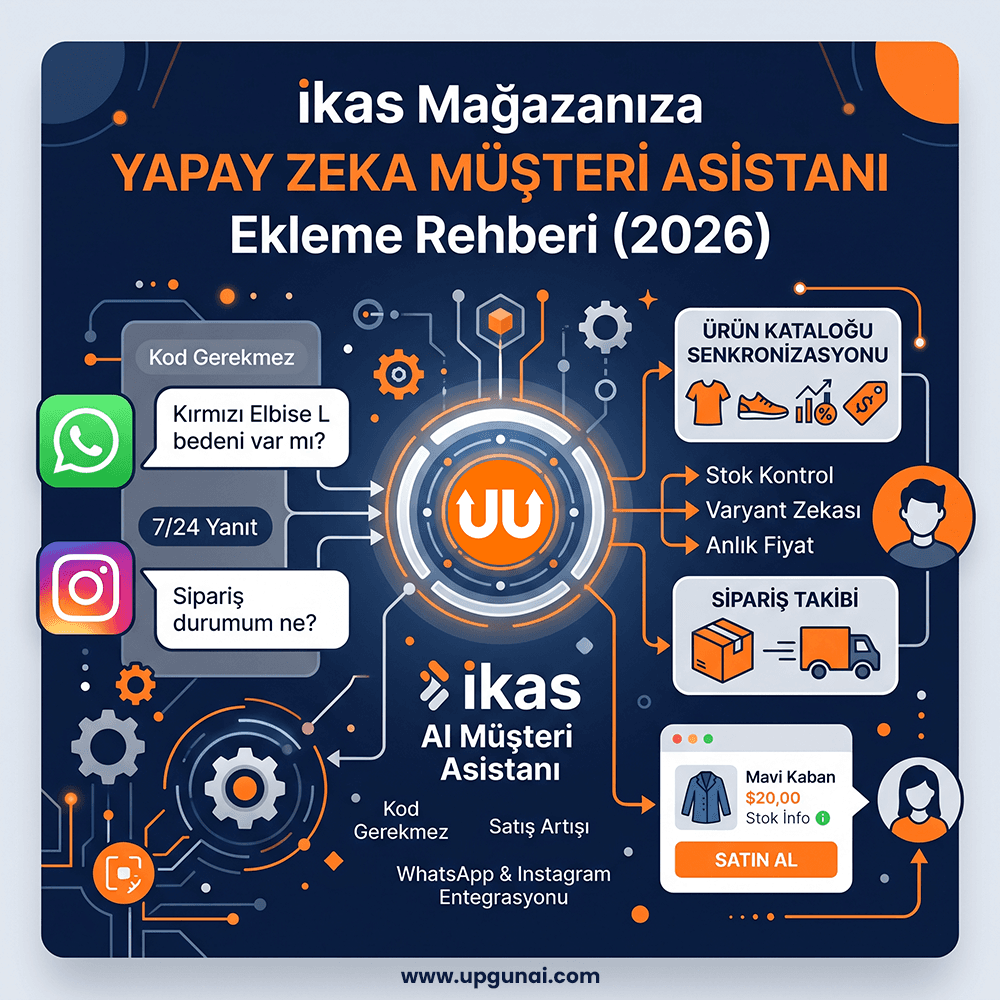
İlk adım, müşterilerinizin size ulaştığı kanalları tek bir gelen kutusunda toplamak. UppyPro'da WhatsApp Business API hattınız ve Instagram hesabınız aynı panele bağlanır.
Bunun pratik faydası şu: Instagram'dan DM atan da WhatsApp'tan yazan da aynı AI asistanla konuşur, aynı müşteri kartına işlenir. Siz hangi kanaldan geldiğine bakmaksızın tüm konuşmaları tek ekrandan izlersiniz.
AI asistan gelen her mesajı okur, niyetini anlar ve mağaza bilgilerinizle cevaplar. Karmaşık bir talep geldiğinde (özel indirim pazarlığı, şikâyet vb.) konuşmayı size devreder ve panelinize bildirim düşürür.
AI, ikas Kataloğunuzu Nasıl Öğrenir?
UppyPro'nun ikas entegrasyonu, mağazanızın ürün kataloğunu otomatik senkronize eder. Bağlantı kurulduğu anda:
- ●Tüm ürünleriniz — ad, açıklama, fiyat, stok, varyantlar (renk/beden), görseller — AI'nın bilgi tabanına işlenir
- ●Ürün güncellediğinizde senkron otomatik yenilenir; AI asla eski fiyat söylemez
- ●Müşteri 'kırmızı elbise arıyorum' yazdığında AI, kataloğunuzdan uygun ürünleri fiyat ve ürün linkiyle önerir
Varyant zekâsı da işin içinde: Müşteri 'Bu elbisenin M bedeni var mı?' diye sorduğunda AI, o varyantın gerçek stok durumunu kontrol eder. Stokta yoksa alternatif önerir — stokta olmayan ürünü asla satmaz.
Sipariş Takibi ve Satın Alma Linki
Sipariş Sorgulama: Müşteri sipariş numarasını yazdığında — hatta yazmasa bile WhatsApp numarasından — AI siparişi bulur: durum, kargo firması, takip numarası, tahmini teslimat. 'Kargom nerede?' sorusu artık sizin sorumluluğunuz değil.
Satın Alma Linki: Müşteri bir ürünü beğendiğinde AI, varyantı netleştirir (hangi renk, hangi beden) ve müşteriyi doğrudan satın almaya götüren ürün linkini paylaşır. Sohbetten satışa giden yol kısalır.
Dekont ve Havale Takibi: Havale/EFT ile ödeme yapan müşteri dekont gönderdiğinde AI bunu algılar, panelinize 'ödeme kontrolü' bildirimi düşürür. Muhasebe süreciniz sohbetin içinde kaybolmaz.
Adım Adım Kurulum
- 1UppyPro hesabınızı açın (7 gün ücretsiz deneme ile başlar)
- 2Panel → Entegrasyonlar → ikas sekmesine gidin
- 3ikas mağaza adınızı ve API bilgilerinizi girin — ürünleriniz dakikalar içinde senkronize olur
- 4WhatsApp Business hattınızı ve/veya Instagram hesabınızı bağlayın
- 5AI Eğitim Sihirbazı'nı çalıştırın: işletme bilgileriniz, kargo/iade politikanız, sıkça sorulan sorularınız AI'ya öğretilir
Toplam süre: yaklaşık 20 dakika. Kod yok, geliştirici yok.
Kurulumdan sonra ilk hafta konuşmaları izleyin: AI'nın cevaplarını panel üzerinden görebilir, gerektiğinde devralabilir, eğitim dökümanını zenginleştirerek asistanı her gün biraz daha 'sizin gibi' konuşur hale getirebilirsiniz. Gelen mesaj tarafı oturduktan sonra sipariş onayı, kargo bildirimi ve sepet hatırlatması gibi giden mesajları da açmak isterseniz e-ticaret WhatsApp otomasyonu ikas mağazaları için hazır.
ikas + UppyPro: Mağazanız Uyurken de Satsın
UppyPro'nun ikas entegrasyonu ürün senkronu, akıllı ürün önerisi, sipariş takibi ve varyant doğrulamayı hazır sunar. WhatsApp ve Instagram mesajlarınız tek panelde, AI asistanınız 7/24 görevde. Vitrindeki ziyaretçiyi de yakalamak için indirim çarkı ekleyebilirsiniz. 7 gün ücretsiz deneyin.
İlgili Yazılar
Shopify'da Sepet Terk Oranını WhatsApp ve Yapay Zeka ile Düşürme Rehberi
9 dk okuma
Ticimax Mağazanıza WhatsApp Yapay Zeka Asistanı: Müşteri Hizmetlerini Otomatikleştirin
8 dk okuma